Electromagnetism & electronics
LCD pixel stack
Electronics · Displays
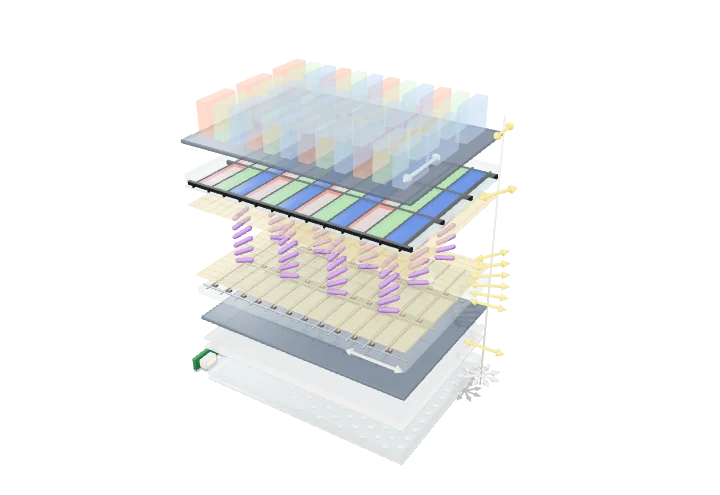 Open the interactive 3D model →
If an LCD screen’s pixels make no light of their own, how do they show a picture?
An LCD screen has a white light shining from behind, and every tiny dot on the screen is a shutter that lets more or less of that light through. The shutters work by twisting light using a special liquid whose rod-shaped molecules can be tipped over by a small voltage. Red, green and blue filters in front turn the shutters into colours.
A liquid-crystal display is an array of electrically controlled light valves in front of a white backlight: two crossed polarisers sandwich a thin layer of liquid crystal whose molecular orientation decides whether the light’s polarisation is rotated. A thin-film transistor at every subpixel sets the voltage across its patch of liquid crystal, and red, green and blue filters turn three grey-level valves into one colour pixel.
Key facts
- Liquid-crystal cell gap
- ≈ 3–5 µm (held by spacer beads or posts)
- Twist in a TN cell
- 90° from one glass to the other
- Typical threshold voltage
- ≈ 1–2 V rms; full switching ≈ 3–5 V
- Subpixels in a 1920 × 1080 panel
- ≈ 6.2 million, each with its own TFT
- Backlight light reaching the viewer
- ≈ 4–8 % (polarisers, colour filters, aperture)
- Row address time at 60 Hz, 1080 rows
- ≈ 15 µs
Parts you can explore (13)
- Edge LEDs
- Light guide plate
- Diffuser films
- Rear polariser
- TFT glass
- Thin-film transistors
- Pixel electrodes
- Alignment layers
- Liquid crystal
- Colour filter
- Front polariser
- Emitted light
- Light polarisation
In the 3D model
Rotate and take apart the model, follow a guided tour of what each part does and why it’s needed, change it with a live slider, and test yourself with a short quiz. Free, no sign-up.
OpenArc Models’ models are simplified teaching schematics. Terms · Privacy